
Flink added support for what it calls Materialized Tables in 1.20, released in 2024. You can read about the design and motivations in FLIP-435. In a nutshell, Materialized Tables provide a way to include the SQL to populate and refresh a table as part of its definition.
Let’s take a look!
Materialized Table basics 🔗
|
Materialized Tables are a new type of object in Flink and require:
|
Since I’m using a Docker-based stack, I’m going to launch the SQL Client like this:
docker compose exec -it jobmanager bash -c \
    "./bin/sql-gateway.sh start && \ (1)
    sleep 2 && \
./bin/sql-client.sh gateway --endpoint http://localhost:8083" (2)| 1 | Start up the SQL Gateway |
| 2 | Use the SQL Gateway from the SQL Client |
First up we’ll create the catalog and set it as active:
SET 'execution.checkpointing.savepoint-dir' = 'file:///shared/savepoints';

CREATE CATALOG mt_cat WITH (
    'type' = 'test-filesystem',
    'path' = '/shared/catalog',
    'default-database' = 'mydb'
);

USE CATALOG mt_cat;
Our source table for the Materialized Table is going to be a table reading data from Kafka:
CREATE TABLE simple_orders (
  order_id INT,
  total_gbp INT
) WITH (
  'connector' = 'kafka', 'topic' = 'orders', 'properties.bootstrap.servers' = 'broker:9092', 'properties.group.id' = 'flink-orders', 'scan.startup.mode' = 'earliest-offset', 'format' = 'json'
);
with some data in it:
INSERT INTO simple_orders
    VALUES  (2, 5),
            (3, 10),
            (4, 5),
            (1, 5),
            (5, 10);
Flink SQL> SELECT * FROM simple_orders;
order_id total_gbp
2 5
3 10
4 5
1 5
5 10And what about the total of these orders? This is where it starts to get funky:
Flink SQL> SELECT SUM(total_gbp) FROM simple_orders;
+----+-------------+
| op |      EXPR$0 |
+----+-------------+
| +I |           5 |
| -U |           5 |
| +U |          15 |
| -U |          15 |
| +U |          20 |
| -U |          20 |
| +U |          25 |
| -U |          25 |
| +U |          35 |
█ (1)| 1 | Notice the cursor, and the absence of a Flink SQL> prompt? |
This query is doing two things that you might not recognise from the RDBMS world:
-
We see the changelog; as each record is read, the
SUM()is restated (+U), with the previous value being replaced (-U). The final record (35) is the value we’d expect. -
The query doesn’t complete; it keeps on running. That’s because the source is unbounded, and the values shown are just as of the data that has been read so far.
Now let’s create a Materialized Table:
CREATE MATERIALIZED TABLE orders_total_mt (
    PRIMARY KEY (total_gbp) NOT ENFORCED (1)
)
WITH ((2)
  'connector' = 'upsert-kafka', 'topic' = 'orders-total-mt', 'properties.bootstrap.servers' = 'broker:9092', 'key.format' = 'json', 'value.format' = 'json'
)
AS SELECT COALESCE(SUM(total_gbp), 0) AS total_gbp FROM simple_orders; (3)| 1 | I’m specifying a primary key because of the connector that I’m using ('upsert-kafka' tables require to define a PRIMARY KEY constraint. The PRIMARY KEY specifies which columns should be read from or write to the Kafka message key. The PRIMARY KEY also defines records in the 'upsert-kafka' table should update or delete on which keys.) |
| 2 | Configuration for the upsert-kafka connector here to persist the table’s data to Kafka. |
| 3 | Because of the primary key (see <1>), this needs to be non-nullable (Could not create a PRIMARY KEY with nullable column 'total_gbp'. A PRIMARY KEY column must be declared on non-nullable physical columns.) |
And did it work? Have we got data in it?
Flink SQL> SELECT * FROM orders_total_mt;
+----+-------------+
| op |   total_gbp |
+----+-------------+
| +I |           5 |
| -D |           5 |
| +I |          15 |
| -D |          15 |
| +I |          25 |
| -D |          25 |
| +I |          35 | (1)
| +I |          20 | (2)
| -D |          20 | (2)
█| 1 | This is the latest value |
| 2 | These two cancel out |
Well…yes. Again with that changelog business, but still giving us the correct answer.
So far, this Materialized Table is nothing extraordinary.
In fact, it’s doing pretty much the same as the CTAS we’ll see below and with which you may already be familiar; creating a table that stores its data in Kafka, and setting a query running to populate it.
You can see the query running as a job, just as you would with a regular INSERT or CTAS:
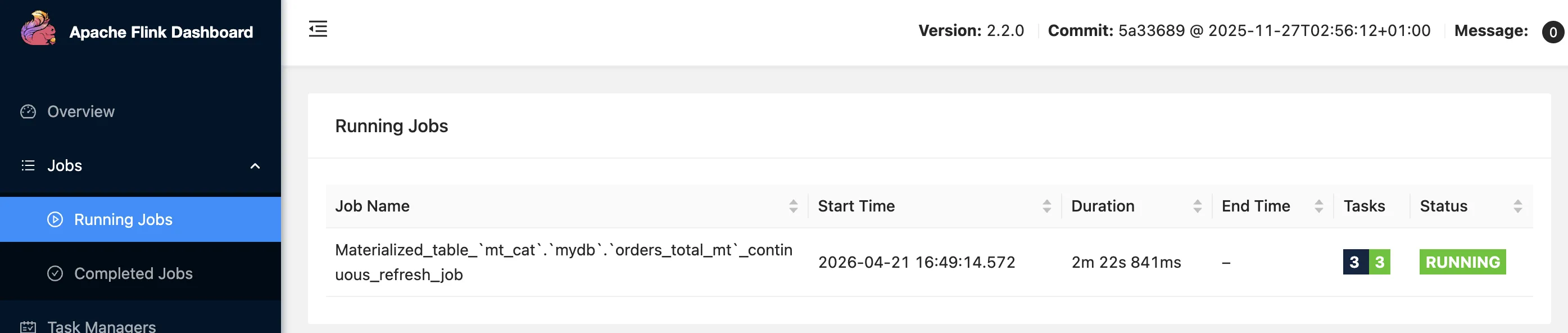
Before we get much more into Materialized Tables, let’s do a quick run through of the alternatives in Flink SQL for defining a table and populating it.
Without Materialized Tables: It’s kinda DDL, and sorta DML 🔗
Materialized Tables move in the direction of solving the sometimes-awkward situation in Flink SQL that a table is part definition (data types, columns, etc) and part job (how to populate it), with the job needing managing and maintaining like any other code.
Let’s create the orders_total table like we saw in batch above, using the first pattern (CREATE, INSERT):
As before, the syntax is a little bit more fiddly because of the underlying persistence
CREATE TABLE orders_total (
    total_gbp INT,
    PRIMARY KEY (total_gbp) NOT ENFORCED
  ) WITH (
    'connector' = 'upsert-kafka', 'topic' = 'orders-total', 'properties.bootstrap.servers' = 'broker:9092', 'key.format' = 'json', 'value.format' = 'json'
  );
This is just the CREATE statement; we’ve not populated it yet.
Now to get data into the table:
Flink SQL> INSERT INTO orders_total (SELECT SUM(total_gbp) FROM simple_orders);
[INFO] Submitting SQL update statement to the cluster...
[INFO] SQL update statement has been successfully submitted to the cluster:
Job ID: 8f666e58599217ad00feab629f8a5a9c (1)| 1 | Check it out ma, we’ve got a Job ID! |
This doesn’t look like your regular RDBMS INSERT, which will return (sometimes after a while) once it’s done.
This returned straight away, but with chat about submitting statements to a cluster.
But what’s going on with this "job"?
We can see it directly in Flink SQL:
Flink SQL> DESCRIBE JOB '8f666e58599217ad00feab629f8a5a9c';
+----------------------------------+-----------------------------------+---------+-------------------------+
|                           job id |                          job name |  status |              start time |
+----------------------------------+-----------------------------------+---------+-------------------------+
| 8f666e58599217ad00feab629f8a5a9c | insert-into_cat.mydb.orders_total | RUNNING | 2026-04-21T10:30:48.054 |
+----------------------------------+-----------------------------------+---------+-------------------------+
1 row in set

Flink SQL>
as well as in the Flink Web UI:
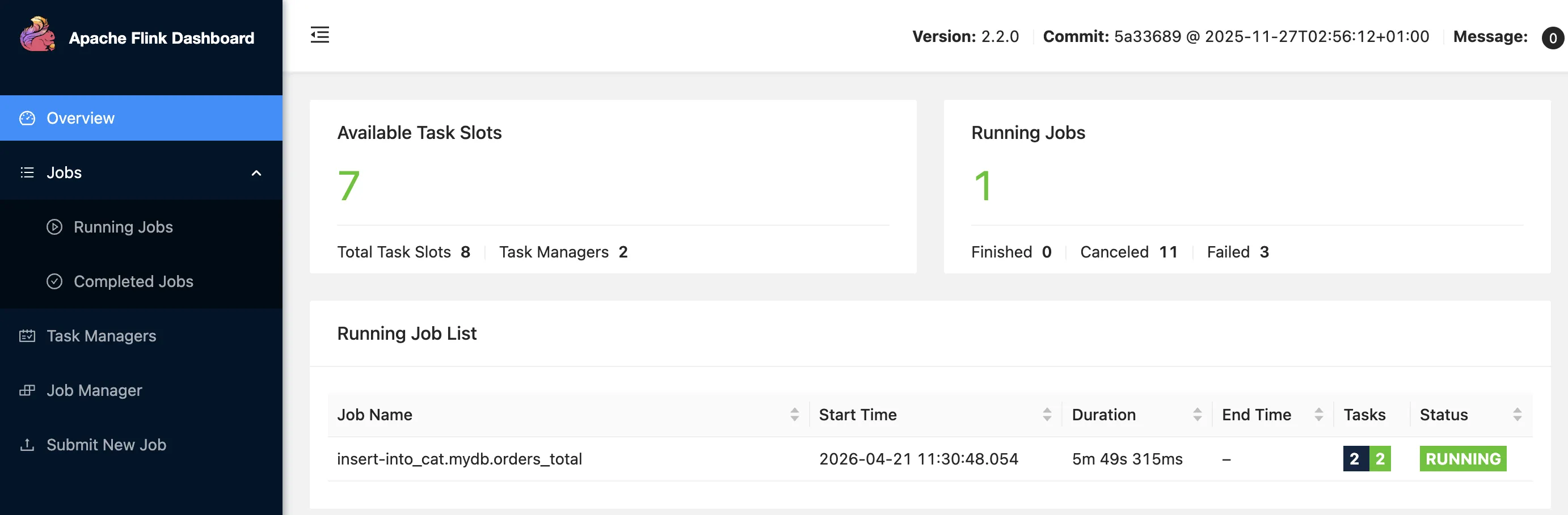
And with the job running, there’s data loaded to the table:
Flink SQL> SELECT * FROM orders_total;
+----+-------------+
| op |   total_gbp |
+----+-------------+
| +I |           5 |
| -D |           5 |
| +I |          15 |
| -D |          15 |
| +I |          25 |
| -D |          25 |
| +I |          35 |
| +I |          20 |
| -D |          20 |
Other than CREATE TABLE/INSERT, the other non-Materialized Table route is to use CREATE TABLE…AS SELECT (CTAS).
Using the CTAS approach, we get a similar behaviour; a populated table, and a job running on the Flink cluster:
CREATE TABLE orders_total_ctas (
    total_gbp INT,
    PRIMARY KEY (total_gbp) NOT ENFORCED
) WITH (
    'connector' = 'upsert-kafka', 'topic' = 'orders-total', 'properties.bootstrap.servers' = 'broker:9092', 'key.format' = 'json', 'value.format' = 'json'
) AS SELECT COALESCE(SUM(total_gbp),0) AS total_gbp FROM simple_orders;
[INFO] Submitting SQL update statement to the cluster...
[INFO] SQL update statement has been successfully submitted to the cluster:
Job ID: dfebb27cd20653d93616945966244c66Flink SQL> DESCRIBE JOB 'dfebb27cd20653d93616945966244c66';
+----------------------------------+--------------------------------------------+---------+-------------------------+
| job id | job name | status | start time |
+----------------------------------+--------------------------------------------+---------+-------------------------+
| dfebb27cd20653d93616945966244c66 | insert-into_mt_cat.mydb.orders_total_ctas | RUNNING | 2026-04-24T09:58:53.895 |
+----------------------------------+--------------------------------------------+---------+-------------------------+
1 row in setNow we’ve got a total of three jobs, all doing the same thing:
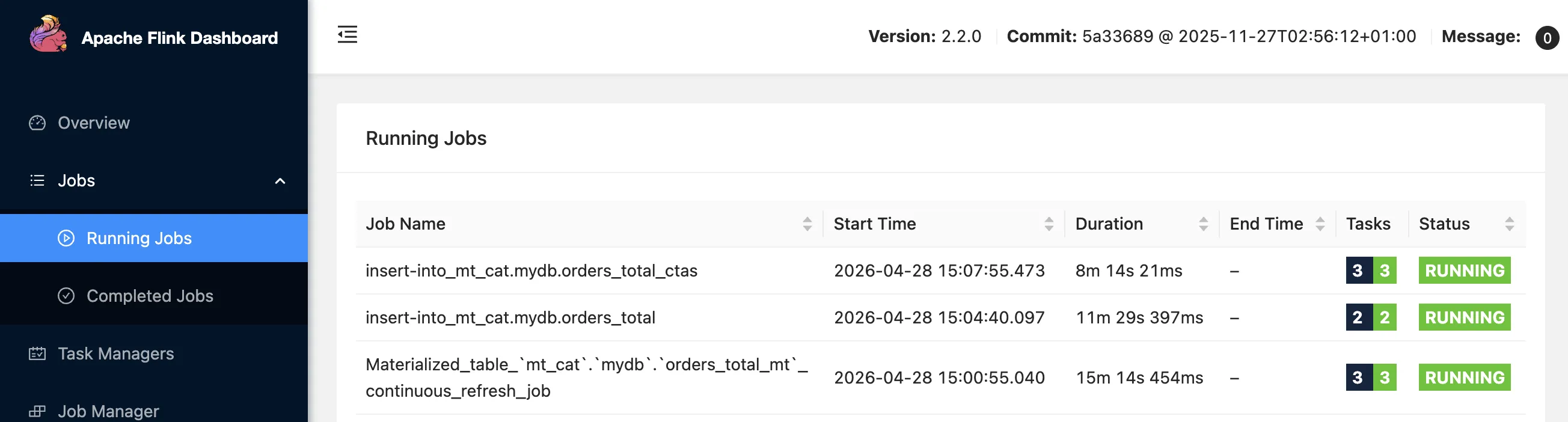
When I insert a record to the source table simple_orders…
INSERT INTO simple_orders VALUES (6, 7);…the three running jobs update their respective tables, and I see the expected result on them:
Flink SQL> SET 'sql-client.execution.result-mode' = 'table'; (1)

Flink SQL> SELECT * FROM orders_total_mt;

   total_gbp
          42

Flink SQL> SELECT * FROM orders_total;

   total_gbp
          42

Flink SQL> SELECT * FROM orders_total_ctas;

   total_gbp
42| 1 | This means I just see the latest calculated value, not the changelog as shown above |
So that’s the three options: CREATE MATERIALIZED TABLE, CREATE TABLE/INSERT, CREATE TABLE…AS SELECT.
Let’s now look at what makes Materialized Tables of interest to us.
Lifecycle Management 🔗
With CREATE TABLE plus INSERT (hereafter noted as CT/I), the query to populate the table is a separate entity from the definition.
Even with the combined CREATE TABLE … AS SELECT (CTAS), it’s just a marriage of convenience; in the background a separate INSERT is fired off, never to be associated with its CTAS parent again.
Since we’re using the test-filesystem catalog we can easily inspect what’s in the catalog just by looking at what’s on disk.
Here’s the catalog entry for both the orders_total (CT/I) and orders_total_ctas (CTAS)—it’s identical for both:
{
  "tableKind" : "TABLE",  "catalogTableInfo" : {
    "properties.bootstrap.servers" : "broker:9092",
    "connector" : "upsert-kafka",
    "schema.0.data-type" : "INT NOT NULL",
    "value.format" : "json",
    "schema.primary-key.name" : "PK_total_gbp",
    "schema.primary-key.columns" : "total_gbp",
    "key.format" : "json",
    "topic" : "orders-total",
    "schema.0.name" : "total_gbp"
  }
}
Contrast this to the Materialized Table, in which the DDL and DML are intertwined and the DML query literally persisted as part of the table definition, along with the query’s execution details:
{
  "tableKind" : "MATERIALIZED_TABLE",
  "catalogTableInfo" : {
    "schema.0.data-type" : "INT NOT NULL",
    "definition-query" : (1)
        "SELECT COALESCE(SUM(`simple_orders`.`total_gbp`), 0) AS `total_gbp`\nFROM `mt_cat`.`mydb`.`simple_orders` AS `simple_orders`",
    "refresh-status" : "ACTIVATED",
    "refresh-handler-bytes" : "rO0ABXNyADdvcmcuYXBhY2hlLmZsaW5rLnRhYmxlLnJlZnJlc2guQ29udGludW91c1JlZnJlc2hIYW5kbGVyAAAAAAAAAAECAARMAAljbHVzdGVySWR0ABJMamF2YS9sYW5nL1N0cmluZztMAA9leGVjdXRpb25UYXJnZXRxAH4AAUwABWpvYklkcQB+AAFMAAtyZXN0b3JlUGF0aHEAfgABeHB0ABNTdGFuZGFsb25lQ2x1c3RlcklkdAAGcmVtb3RldAAgNmFlNjBjZGU5N2VlMmMxZGU2MGVjNDhjMWZmZWY1NjFw",
    "freshness-interval" : "3", (1)
    "refresh-mode" : "CONTINUOUS", (1)
    "properties.bootstrap.servers" : "broker:9092",
    "connector" : "upsert-kafka",
    "value.format" : "json",
    "freshness-unit" : "MINUTE",
    "refresh-handler-desc" : "{\n executionTarget=remote,\n clusterId=StandaloneClusterId,\n jobId=6ae60cde97ee2c1de60ec48c1ffef561\n}",
    "schema.primary-key.name" : "PK_total_gbp",
    "schema.primary-key.columns" : "total_gbp",
    "key.format" : "json",
    "topic" : "orders-total-mt",
    "logical-refresh-mode" : "AUTOMATIC",
    "schema.0.name" : "total_gbp"
  }
}| 1 | These fields all hold information about the refresh query itself, not just the standard table DDL |
As a simple example of the benefits, consider lifecycle management of the query.
Here are all three table population statements running:
What happens if we restart the task managers?
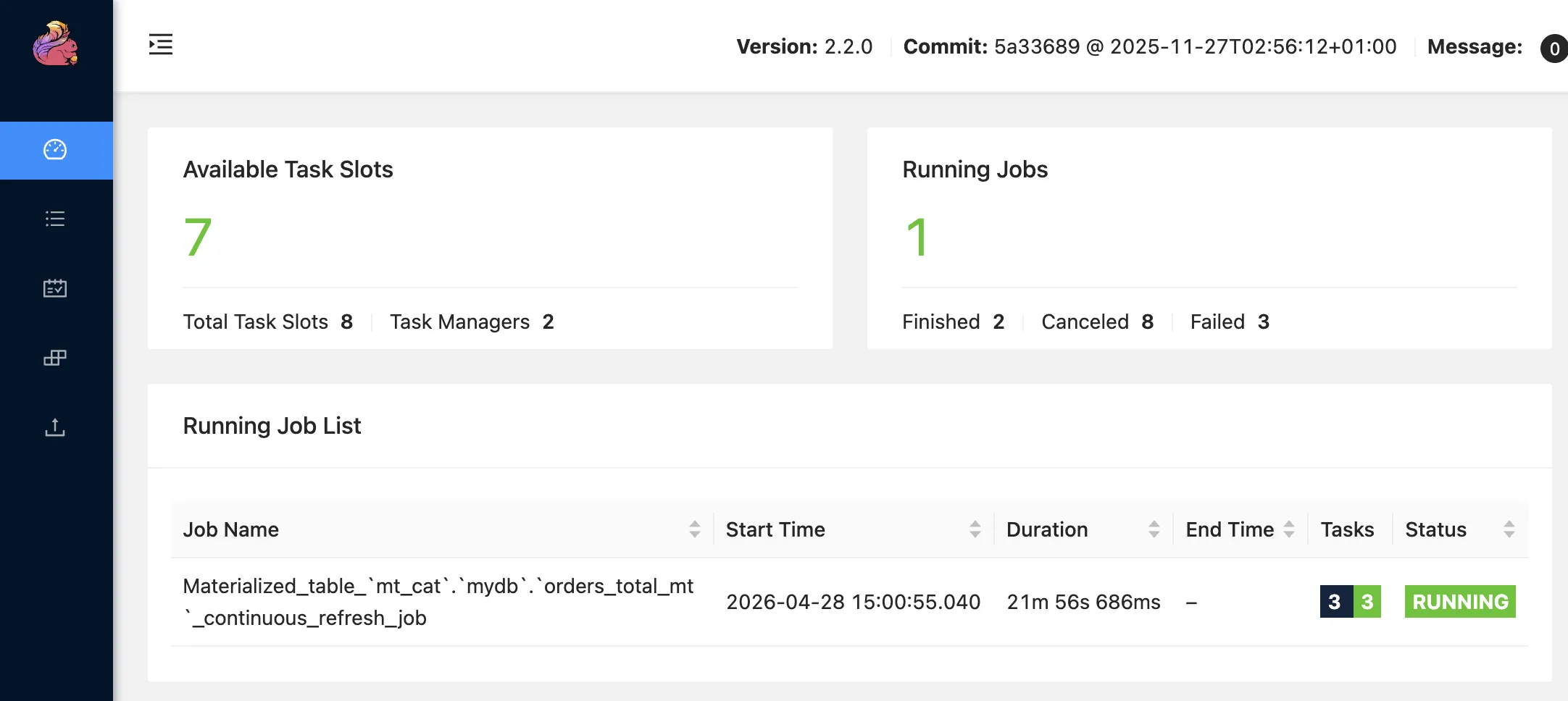
Ooops.
Only one left, for the Materialized Table.
The two INSERT statements (one directly from INSERT, the other a product of the CTAS) got killed, and not restarted.
Why would they get restarted?
They’re just INSERT statements, with no lifecycle guarantees attached to them.
Contrast that to the Materialized Table, which includes this persistence of the definition of how it is populated, and thus Flink can resurrect the query.
Schema evolution 🔗
What if we want to add a new column to the table being populated? In this example, that could be a count of the total orders (to go with the sum of the orders which is what we’ve already got).
With both CT/I and CTAS it gets messy.
I’ve dropped and recreated both (since they got killed in the restart above), so their INSERT statements are running again now (as, presumably, they would be by default when we want to evolve the schema).
Let’s see how it works.
Flink SQL> ALTER TABLE orders_total ADD order_ct INT;
[INFO] Execute statement succeeded.
Flink SQL> SELECT * FROM orders_total;
total_gbp order_ct
42 <NULL>No value for order_ct.
Remember; the INSERT from before is still running:
INSERT INTO orders_total (SELECT SUM(total_gbp) FROM simple_orders);And this only populates the existing total_gbp field.
Let’s kill the existing INSERT:
Flink SQL> SHOW JOBS;
+----------------------------------+--------------------------------------+----------+-------------------------+
|                           job id |                             job name |   status |              start time |
+----------------------------------+--------------------------------------+----------+-------------------------+
| 12af3aa38e4815ca3faa04be0fe51a51 | insert-into_mt_cat.mydb.orders_total |  RUNNING | 2026-04-24T10:54:24.990 |
[…]
Flink SQL> STOP JOB '12af3aa38e4815ca3faa04be0fe51a51';
Now to run a new one, including the additional field:
Flink SQL> INSERT INTO orders_total (SELECT SUM(total_gbp),COUNT(*) FROM simple_orders);
[ERROR] Could not execute SQL statement. Reason:
org.apache.flink.table.api.ValidationException: Column types of query result and sink for 'mt_cat.mydb.orders_total' do not match.
Cause: Incompatible types for sink column 'order_ct' at position 1.

Query schema: [EXPR$0: INT, EXPR$1: BIGINT NOT NULL]
Sink schema:  [total_gbp: INT, order_ct: INT]
Uh oh, schema mismatch. This is fiddly, right? Try again:
Flink SQL> ALTER TABLE orders_total DROP order_ct;
[INFO] Execute statement succeeded.

Flink SQL> ALTER TABLE orders_total ADD order_ct BIGINT NOT NULL;
[INFO] Execute statement succeeded.

Flink SQL> INSERT INTO orders_total (SELECT SUM(total_gbp),COUNT(*) FROM simple_orders);
[INFO] Submitting SQL update statement to the cluster...
[INFO] SQL update statement has been successfully submitted to the cluster:
Job ID: 8c197789f2b4966e97ed8d4002feb775
The new INSERT runs, but it turns out that the table’s still not happy when it comes to querying it:
Flink SQL> SELECT * FROM orders_total;
[ERROR] Could not execute SQL statement. Reason:
org.apache.flink.table.runtime.operators.sink.constraint.EnforcerException: Column 'order_ct' is NOT NULL, however, a null value is being written into it.
You can set job configuration 'table.exec.sink.not-null-enforcer'='DROP' to suppress this exception and drop such records silently.|
The reason is almost by-the-by here, but for completeness: the table is backed by a Kafka topic, and when we read from the table the first records fetched will be those populated by the initial Yes there’s a workaround, but this is not the happy path that it could be. |
There are similar troubles with CTAS—the process (and problems) are exactly the same as I just demonstrated for CT/I above.
As a bonus we get just a little bit more ambiguity because of the coupled-but-not issue with the INSERT query that it spawns (as in, CTAS includes the definition, but subsequently it’s just an INSERT running on its own, for us to care for and water).
Compare all this to life with Materialized Tables:
Flink SQL> ALTER MATERIALIZED TABLE orders_total_mt
                AS SELECT COALESCE(SUM(total_gbp), 0) AS total_gbp,
                          COUNT(*) AS order_ct
                    FROM simple_orders;
[INFO] Execute statement succeeded.

Flink SQL> SELECT * FROM orders_total_mt;

   total_gbp             order_ct
          42                    6
No errors, no drama.
In the background, Flink stopped the first job, and started up a new one to include the new column:
Flink SQL> SHOW JOBS;
+----------------------------------+----------+-----------------------------------------------------------------------------+-------------------------+
|                           job id |   status |                                                                    job name |              start time |
+----------------------------------+----------+-----------------------------------------------------------------------------+-------------------------+
| 6ae60cde97ee2c1de60ec48c1ffef561 | FINISHED | Materialized_table_`mt_cat`.`mydb`.`orders_total_mt`_continuous_refresh_job | 2026-04-24T10:05:30.647 |
| a7a77aa3f909b6debb25c25d5d3c5de0 |  RUNNING | Materialized_table_`mt_cat`.`mydb`.`orders_total_mt`_continuous_refresh_job | 2026-04-24T11:09:07.887 |
+----------------------------------+----------+-----------------------------------------------------------------------------+-------------------------+
See the documentation for full details of what’s supported in schema evolution, as well as caveats. Significantly, the docs do note:
The new refresh job starts from the beginning and does not restore from the previous state.
The new refresh job will not restore from the state of the original refresh job.
Pause and Resume execution 🔗
With our Materialized Table we can suspend its execution:
ALTER MATERIALIZED TABLE orders_total_mt SUSPEND;Then, if we add some data to the source table:
INSERT INTO simple_orders VALUES (7,10);We’ll see that these new records aren’t reflected in the Materialized Table:
Flink SQL> SELECT SUM(total_gbp) AS total_gbp, COUNT(*) AS order_ct FROM simple_orders;
   total_gbp             order_ct
          52                    7

Flink SQL> SELECT * FROM orders_total_mt;
   total_gbp             order_ct
          42                    6
We can then RESUME the Materialized Table:
ALTER MATERIALIZED TABLE orders_total_mt RESUME;and the Materialized Table shows the updated data:
Flink SQL> SELECT * FROM orders_total_mt;
   total_gbp             order_ct
          52                    7
The key thing here is that when we SUSPEND the Materialized Table Flink takes a savepoint.
This is much easier than stopping a job (as we’d do with CT/I / CTAS) and having to start a new one from the start, since Flink will use the savepoint to start its processing from where it got to before it was suspended.
This very clean, SQL-driven, way of managing a table and its job could come in handy in several ways:
-
In the event of upstream data quality issues, rather than continuing to propagate suspect data—but without pulling the parachute cord of killing the job and losing its state—you can just suspend it whilst you investigate the problem.
-
Server maintenance, Flink upgrades, etc.
-
If there are availability problems with the table’s source (remember, Flink tables can use connectors against numerous systems, such as RDBMS, flat files, etc etc) you can suspend reading from it rather than dealing with a flood of errors.
Batch, Streaming, or Both? 🔗
One of the pitches for Materialized Tables in Flink is that it 'unifies' batch and streaming, and dispenses with the Lambda/Kappa concept.
By having one SQL concept (Materialized Tables) with different configuration options you can define your data manipulation logic once and execute it as you want in both streaming or batch.
This is defined by a parameter called REFRESH_MODE.
In the example above the Materialized Table was using an effective REFRESH_MODE of CONTINUOUS, i.e. a streaming query, per the Flink job that we saw running.
To explore the other REFRESH_MODE, which is FULL, we need a source connector that supports bounded reads.
You can find a list of connectors within the Flink project here which includes annotation as to what kind of source mode they support.
Here we’ll stick with test-filesystem just for convenience:
CREATE TABLE orders_file (
    order_id INT,
    total_gbp INT
) WITH (
    'format' = 'json'
);

INSERT INTO orders_file VALUES (1, 5), (2, 10), (3, 15);
SELECT * FROM orders_file;
order_id total_gbp
1 5
2 10
3 15So now for our Materialized Table:
CREATE MATERIALIZED TABLE orders_total_mt_file_full
WITH ( 'format' = 'json' ) (1)
FRESHNESS = INTERVAL '5' MINUTE (2)
REFRESH_MODE = FULL (3)
AS SELECT COALESCE(SUM(total_gbp), 0) AS total_gbp FROM orders_file;| 1 | We’re using the test-filesystem catalog to store the data for this table. |
| 2 | We’ll talk about FRESHNESS in the next section |
| 3 | FULL refresh mode |
The SELECT works…but there’s no data in the table 😿
Flink SQL> SET 'sql-client.execution.result-mode' = 'tableau';
[INFO] Execute statement succeeded.

Flink SQL> SELECT * FROM orders_total_mt_file_full;
+----+-------------+
| op |   total_gbp |
+----+-------------+
Received a total of 0 row (0.18 seconds)

Flink SQL>
Unlike CONTINUOUS refresh, which runs as a job on the task manager, FULL refresh is managed on a scheduler that’s provided by the SQL Gateway.
When we create the Materialized Table we see it added an entry in the scheduler on SQL Gateway:
2026-04-27 10:33:06,828 INFO  org.apache.flink.table.gateway.workflow.scheduler.EmbeddedQuartzScheduler []
Create quartz schedule job for materialized table `mt_cat`.`mydb`.`orders_total_mt_file_full` successfully,
job info: default_group.quartz_job_`mt_cat`.`mydb`.`orders_total_mt_file_full`,
cron expression: 0 0/5 * * * ? *.                                                                                                                              │
Check out the cron expression—that’s driven by the FRESHNESS = INTERVAL '5' MINUTE configuration.
We can sit tight and wait, or we can manually kick a refresh off ourselves:
Flink SQL> ALTER MATERIALIZED TABLE orders_total_mt_file_full REFRESH;
+----------------------------------+---------------------------+
|                           job id |              cluster info |
+----------------------------------+---------------------------+
| 2215db412d0ef0551ae0704bebb978bd | {execution.target=remote} |
+----------------------------------+---------------------------+
1 row in set

Flink SQL> SHOW JOBS;
+----------------------------------+----------+-------------------------------------------------------------------------------------+-------------------------+
|                           job id |   status |                                                                            job name |              start time |
+----------------------------------+----------+-------------------------------------------------------------------------------------+-------------------------+
| 2215db412d0ef0551ae0704bebb978bd | FINISHED | Materialized_table_`mt_cat`.`mydb`.`orders_total_mt_file_full`_one_time_refresh_job | 2026-04-27T11:27:32.863 |
And now we have data:
Flink SQL> SELECT * FROM orders_total_mt_file_full;
+----+-------------+
| op |   total_gbp |
+----+-------------+
| +I |          30 | (1)
+----+-------------+
Received a total of 1 row (0.19 seconds)| 1 | Note how it’s a single value, rather than a changelog series of +I, -U, +U rows like we saw with the Kafka sink above |
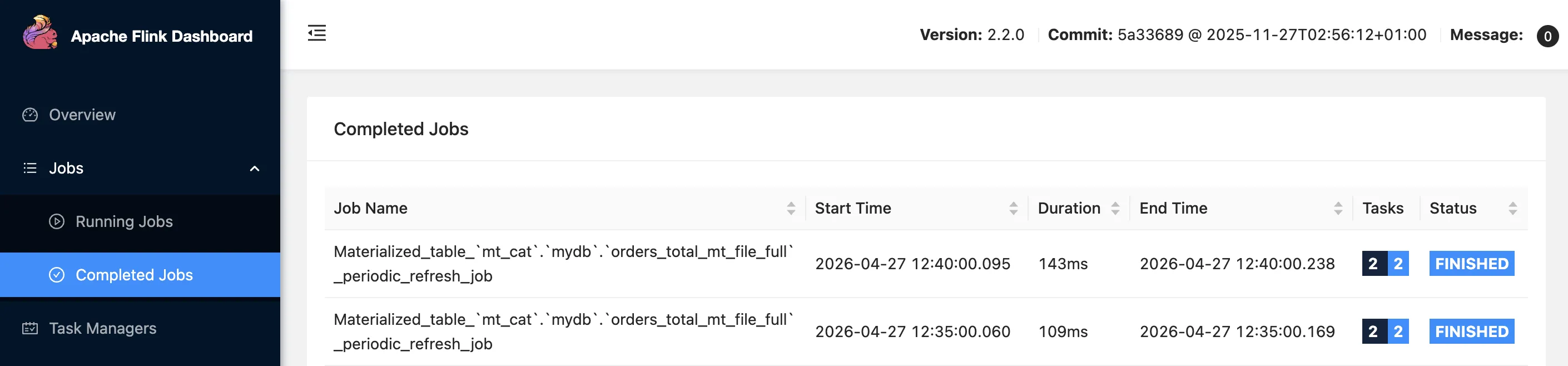
Over in the Flink Web UI we can see the periodic refreshes of the table successfully executing:
One thing that’s important to note about the refresh jobs is the SQL that gets run:
INFO  org.apache.flink.table.gateway.service.materializedtable.MaterializedTableManager [] -
Begin to refreshing the materialized table
`mt_cat`.`mydb`.`orders_total_mt_file_full`, statement:
INSERT OVERWRITE `mt_cat`.`mydb`.`orders_total_mt_file_full` (1)
SELECT * FROM (SELECT COALESCE(SUM(`orders_file`.`total_gbp`), 0) AS `total_gbp`
FROM `mt_cat`.`mydb`.`orders_file` AS `orders_file`)| 1 | INSERT OVERWRITE replaces the contents of the target table (or partition; see below). |
Batch to Kafka? Nope. 🔗
In the earlier section when we created a Materialized Table reading and writing from Kafka topics, we didn’t set a REFRESH_MODE.
What happened was that Flink set an implicit value for it, which we can see if we examine the DDL that Flink reads back for the table:
Flink SQL> SHOW CREATE MATERIALIZED TABLE orders_total_mt;

CREATE MATERIALIZED TABLE `mt_cat`.`mydb`.`orders_total_mt` (
  CONSTRAINT `PK_total_gbp` PRIMARY KEY (`total_gbp`) NOT ENFORCED
)
WITH (
  'connector' = 'upsert-kafka',
  'key.format' = 'json',
  'properties.bootstrap.servers' = 'broker:9092',
  'topic' = 'orders-total-mt',
  'value.format' = 'json'
)
FRESHNESS = INTERVAL '3' MINUTE (1)
REFRESH_MODE = CONTINUOUS (1)
AS SELECT COALESCE(SUM(`simple_orders`.`total_gbp`), 0) AS `total_gbp`, COUNT(*) AS `order_ct`
FROM `mt_cat`.`mydb`.`simple_orders` AS `simple_orders`| 1 | These weren’t in the submitted SQL; Flink added these. |
This is where it gets a bit funky though, and also exposes some of the slightly rough edges on the current implementation of Materialized Tables. What if we decide we’d like to set the Materialized Table to refresh on a batch schedule instead?
Here’s what happens:
Flink SQL> CREATE MATERIALIZED TABLE orders_total_mt__full (
                PRIMARY KEY (total_gbp) NOT ENFORCED
            )
            WITH (
                'connector' = 'upsert-kafka', 'topic' = 'orders_total_mt__full', 'properties.bootstrap.servers' = 'broker:9092', 'key.format' = 'json', 'value.format' = 'json'
            )
            FRESHNESS = INTERVAL '5' MINUTE
            REFRESH_MODE = FULL (1)
            AS SELECT COALESCE(SUM(total_gbp), 0) AS total_gbp FROM simple_orders;
[INFO] Execute statement succeeded.| 1 | Use batch refresh for the Materialized Table reading and writing from Kafka. |
Flink tells me it’s succeeded. But has it actually?

The table’s there, sure:
Flink SQL> SHOW TABLES;
+-----------------------+
|            table name |
+-----------------------+
| orders_total_mt__full |
[…]
But…
Flink SQL> SELECT * FROM orders_total_mt__full;

[ERROR] Could not execute SQL statement. Reason:
org.apache.flink.kafka.shaded.org.apache.kafka.common.errors.UnknownTopicOrPartitionException:
This server does not host this topic-partition. (1)| 1 | The target Kafka topic hasn’t been populated (or even created). Something went wrong! |
So whilst the Materialized Table created successfully, it looks like it’s not got any data in it. Let’s take a look at the SQL Gateway log. As if on cue, at the next 5-minute interval since the epoch, the job kicks off:
org.apache.flink.table.gateway.service.utils.SqlExecutionException: Refreshing the materialized table `mt_cat`.`mydb`.`orders_total_mt__full` occur exception.
Caused by: org.apache.flink.table.api.ValidationException:
Querying an unbounded table 'mt_cat.mydb.simple_orders' (1)
in batch mode is not allowed. The table source is unbounded. (1)| 1 | It fails per the reason on the final line there—the source for the table is a Flink table reading from a Kafka topic, and since Kafka topics are unbounded, Flink won’t do a batch read from it. |
Logically, this makes sense; but some kind of "canary test" of the Materialized Table’s refresh query might be a useful thing to add to the CREATE process, instead of the silent failure and log-diving necessary to surface it.
Refresh frequency 🔗
I’ve already trailed some of the details about the frequency with which Materialized Tables can be set to refresh above.
It’s configured by the FRESHNESS setting, which per the documentation defines:
Data freshness defines the maximum amount of time that the materialized table’s content should lag behind updates to the base tables.
-
For tables using
FULLrefresh mode, the refresh query is run on a schedule determined by theFRESHNESSvalue that you set, translated by Flink into a cron schedule. By default, the schedule is implemented on the built-in scheduler on the SQL Gateway. It’s worth noting that if it takes a long time to execute, the actual freshness may be noticeably longer than that specified. -
For
CONTINUOUSrefresh, theFRESHNESSdefines how often the table’s refresh job will checkpoint the data. This is important for connectors (e.g. Iceberg—although perhaps a bad example as Iceberg doesn’t yet support Materialized Tables) that rely on a checkpoint to flush data to cause it to be readable.
One interesting sidenote for FULL refresh mode is that since the schedule uses a cron expression, there are restrictions on what the value for FRESHNESS can be.
The docs say it must be:
a common divisor of the respective time interval unit.
So if you’re using an HOUR interval, the value must be divisible into 24, for MINUTE into 60, etc.
If you get it wrong, Flink will tell you:
org.apache.flink.table.api.ValidationException:
In full refresh mode, only freshness that are factors of 60 are currently
supported when the time unit is MINUTE.
Defaulting on the defaults 🔗
When I introduced the first Materialized Table query at the top of this article, I didn’t specify REFRESH_MODE or FRESHNESS.
I’m all for minimum-required defaults enabling users to get up and running with software, but here there is potential for some serious ambiguity.
I’ve gone through the docs and code to try and distil down how Flink will handle the non-provision of both or either of these settings.
-
If you do specify
REFRESH_MODEbut notFRESHNESSthen forFRESHNESSFlink uses the values of system configuration option relating to the refresh mode you’ve chosen:REFRESH_MODE FRESHNESSdefaultConfiguration CONTINUOUS3 minutes
materialized-table.default-freshness.continuousFULL1 hour
materialized-table.default-freshness.full -
If you do specify
FRESHNESSbut notREFRESH_MODEthen Flink determinesREFRESH_MODEby comparingFRESHNESSto the configurationmaterialized-table.refresh-mode.freshness-threshold(which has a default of 30 minutes).If your value of
FRESHNESSis less than thefreshness-thresholdFlink will useCONTINUOUS, otherwise it’ll useFULL.If you want to use a different REFRESH_MODEthan this logic sets, then just configureREFRESH_MODEdirectly. -
And finally, what happens if you don’t specify a
REFRESH_MODEorFRESHNESSat all? This is where it gets less clear :)If you don’t specify a
REFRESH_MODEorFRESHNESSthen Flink will default to an internal value ofAUTOMATICfor theREFRESH_MODE. You can actually see that if you look closely at the catalog entry that I quoted above, which includes"logical-refresh-mode" : "AUTOMATIC".Flink then defaults the
FRESHNESSto the value ofmaterialized-table.default-freshness.continuous(default: 3 minutes):// User omitted freshness, choose default based on logical mode if (table.getLogicalRefreshMode() == LogicalRefreshMode.FULL) { finalFreshness = defaultFullFreshness; } else { // For AUTOMATIC or CONTINUOUS modes, use the continuous default finalFreshness = defaultContinuousFreshness; }From there, now that it has a value for
FRESHNESS, it follows the logic above usingmaterialized-table.refresh-mode.freshness-threshold.
My tl;dr from this is that you don’t want to leave these values to the defaults for some poor sod who ends up maintaining your DDL having to try and pick through.
Be deliberate and explicit in how you configure your Materialized Table REFRESH_MODE, that way the person operating the pipeline will have a clear handle at least on the FRESHNESS that will be used—and indeed, you may not want to hardcode freshness for each Materialized Table and manage it at a system level.
Partitions 🔗
Let’s now look at the idea of partition-specific updates and refreshes.
|
At the moment there’s limited support for Materialized Tables in the ecosystem beyond Flink. For example, whilst it would make tons of sense in Iceberg (particularly with the partitioning stuff I’m about to show you), it’s not been implemented yet. Currently (April 2026) only Paimon supports partitioned Materialized Tables (along with a |
In the examples above I took a set of transactions and aggregated them up to one single total. What is much more common in the real world is aggregating by one or more dimensions. These dimensions could be things like date, customer, product, business unit, etc. Sometimes the volume of data can dictate that physically partitioning this data by a dimension at the storage layer will help performance and manageability.
For this example I’m going to use a base transaction table that includes customer and date dimensions, and then aggregate it up by date which I’ll also partition by.
Here’s the source table:
CREATE TABLE user_orders (
  order_id    BIGINT,
  order_date  DATE NOT NULL,
  user_id     BIGINT,
  user_name   STRING,
  amount      BIGINT
) WITH ( 'format' = 'json' );
with some data:
INSERT INTO user_orders (order_id, order_date, user_id, user_name, amount)
VALUES (1001, DATE '2026-04-18', 1, 'alice', 1500),
        (1002, DATE '2026-04-18', 2, 'bob', 2300),
        (1003, DATE '2026-04-18', 3, 'carol', 800),
        (1004, DATE '2026-04-19', 1, 'alice', 1200),
        (1005, DATE '2026-04-19', 2, 'bob', 3100),
        (1006, DATE '2026-04-19', 3, 'carol', 1900),
        (1007, DATE '2026-04-20', 1, 'alice', 500),
        (1008, DATE '2026-04-20', 4, 'dave', 4200);
Now to create the Materialized Table (using the test-filesystem connector)
CREATE MATERIALIZED TABLE daily_order_summary
    PARTITIONED BY (order_date) (1)
WITH ('format'='json')
REFRESH_MODE = FULL
AS SELECT   order_date,
            SUM(amount)  AS total_amount,
            COUNT(*)     AS order_count
    FROM    user_orders
GROUP BY order_date;| 1 | Ooooh partitions! |
Check the data:
Flink SQL> SELECT * FROM daily_order_summary;
+----+------------+----------------------+----------------------+
| op | order_date |         total_amount |          order_count |
+----+------------+----------------------+----------------------+
Received a total of 0 row (0.23 seconds)
Oh noes!
But wait…what did we learn above, both about REFRESH_MODE = FULL and the absence of FRESHNESS?
With FULL the loading of data is done on a schedule, and without a value for FRESHNESS Flink will default to materialized-table.default-freshness.full, which is 1 hour.
Given that we created the table at 16:56 (as we can see from its schedule being created on the SQL Gateway)…
16:56:16,282 INFO  org.apache.flink.table.gateway.workflow.scheduler.EmbeddedQuartzScheduler []
Create quartz schedule job for materialized table `mt_cat`.`mydb`.`daily_order_summary` successfully, job info:
default_group.quartz_job_`mt_cat`.`mydb`.`daily_order_summary`, cron expression: 0 0 0/1 * * ? *.
…it means we should see the job run in the next few minutes…

and there it goes!
17:00:00,016 INFO  org.apache.flink.table.gateway.workflow.scheduler.EmbeddedQuartzScheduler [] -
                    Execute refresh operation for workflow: WorkflowInfo{materializedTableIdentifier='`mt_cat`.`mydb`.`daily_order_summary`', dynamicOptions={}, initConfig={execution.checkpointing.savepoint-dir=file:///shared/savepoints}, executionConfig={}, restEndpointUrl='http://0.0.0.0:8083'}.
17:00:00,039 INFO  org.apache.flink.table.gateway.service.materializedtable.MaterializedTableManager [] -
                    Begin to refreshing the materialized table `mt_cat`.`mydb`.`daily_order_summary`,
                    statement: INSERT OVERWRITE `mt_cat`.`mydb`.`daily_order_summary`
Flink SQL> SHOW JOBS;
+----------------------------------+----------+-------------------------------------------------------------------------------+-------------------------+
| job id | status | job name | start time |
+----------------------------------+----------+-------------------------------------------------------------------------------+-------------------------+
| 261181049fca90b15786b09e383eae18 | FINISHED | Materialized_table_`mt_cat`.`mydb`.`daily_order_summary`_periodic_refresh_job | 2026-04-27T17:00:00.370 |
[…]But, alas!
Flink SQL> SELECT * FROM daily_order_summary;
+----+------------+----------------------+----------------------+
| op | order_date |         total_amount |          order_count |
+----+------------+----------------------+----------------------+
[ERROR] Could not execute SQL statement. Reason:
java.time.format.DateTimeParseException:
Text '20561' could not be parsed at index 0
Under the covers Flink is writing the date as an epoch day (20561 being the epoch day for 2026-04-18), whilst reading it in a different way and failing.
Let’s try again, and be explicit in how to store it:
DROP MATERIALIZED TABLE daily_order_summary;

CREATE MATERIALIZED TABLE daily_order_summary
    PARTITIONED BY (order_date)
WITH ('format'='json',
      'partition.fields.order_date.date-formatter' = 'yyyy-MM-dd') (1)
REFRESH_MODE = FULL
AS SELECT   CAST(order_date AS STRING) AS order_date, (2)
            SUM(amount)  AS total_amount,
            COUNT(*)     AS order_count
    FROM    user_orders
GROUP BY order_date;| 1 | Specify the format for the date when reading and writing |
| 2 | Needs to be written as a STRING |
Specifying a date as a string gives me strong ick vibes.
A date is a date, not a string.
Date-based partitioning is cool, but ending up with a STRING in the target Materialized Table feels off to me (now your end users have to figure out how to handle it, what format it is, etc).
|
So now our Materialized Table is recreated, let’s force a load of it instead of waiting for the next :00/:30 to roll around on the clock:
Flink SQL> ALTER MATERIALIZED TABLE daily_order_summary REFRESH;
+----------------------------------+---------------------------+
|                           job id |              cluster info |
+----------------------------------+---------------------------+
| 0490ff33c9a8a530592b8451f7da43df | {execution.target=remote} |
+----------------------------------+---------------------------+

Flink SQL> SHOW JOBS;
+----------------------------------+----------+-------------------------------------------------------------------------------+-------------------------+
|                           job id |   status |                                                                      job name |              start time |
+----------------------------------+----------+-------------------------------------------------------------------------------+-------------------------+
| 0490ff33c9a8a530592b8451f7da43df | FINISHED | Materialized_table_`mt_cat`.`mydb`.`daily_order_summary`_one_time_refresh_job | 2026-04-27T17:26:08.799 |

Flink SQL> SELECT * FROM daily_order_summary;
+----+------------+--------------+-------------+
| op | order_date | total_amount | order_count |
+----+------------+--------------+-------------+
| +I | 2026-04-20 |         4700 |           2 |
| +I | 2026-04-18 |         4600 |           3 |
| +I | 2026-04-19 |         6200 |           3 |
+----+------------+--------------+-------------+
Received a total of 3 rows (0.22 seconds)
Woo, we have data!
We can see it on disk too, laid out in partitions:
$ tree flink-shared/catalog/mydb/
flink-shared/catalog/mydb/
├── daily_order_summary
│   ├── data
│   │   ├── order_date=2026-04-18
│   │   │   └── part-b86894d8-b96f-4add-857e-9a29121e45f9-task-0-file-0
│   │   ├── order_date=2026-04-19
│   │   │   └── part-b86894d8-b96f-4add-857e-9a29121e45f9-task-0-file-1
│   │   └── order_date=2026-04-20
│   │       └── part-b86894d8-b96f-4add-857e-9a29121e45f9-task-0-file-2
│   └── schema
│       └── daily_order_summary_schema.json
And since it’s in partitions, we can take advantage of the functionality in Materialized Tables to only refresh a specific partition:
Flink SQL> ALTER MATERIALIZED TABLE daily_order_summary REFRESH PARTITION (order_date='2026-04-20');
+----------------------------------+---------------------------+
|                           job id |              cluster info |
+----------------------------------+---------------------------+
| f7b979f004cbf88d574bb07509ed57e8 | {execution.target=remote} |
+----------------------------------+---------------------------+
1 row in set

Flink SQL> SHOW JOBS;
+----------------------------------+----------+--------------------------------------------------------------------------------+-------------------------+
|                           job id |   status |                                                                       job name |              start time |
+----------------------------------+----------+--------------------------------------------------------------------------------+-------------------------+
| f7b979f004cbf88d574bb07509ed57e8 | FINISHED |  Materialized_table_`mt_cat`.`mydb`.`daily_order_summary`_one_time_refresh_job | 2026-04-28T09:13:55.198 |
[…]
How do we know it only refreshed the data for a single partition (2026-04-20)?
In the SQL Gateway logs we can see the SQL used:
INSERT OVERWRITE `mt_cat`.`mydb`.`daily_order_summary`
  SELECT * FROM (SELECT CAST(`user_orders`.`order_date` AS STRING) AS `order_date`, SUM(`user_orders`.`amount`) AS `total_amount`, COUNT(*) AS `order_count`
FROM `mt_cat`.`mydb`.`user_orders` AS `user_orders`
GROUP BY `user_orders`.`order_date`)
WHERE order_date = '2026-04-20' (1)| 1 | Predicate on order_date as expected, matching the […] REFRESH PARTITION (order_date='2026-04-20') statement that we ran |
So we can do partition-specific refreshes—pretty useful for things like recomputing once missing data has arrived for a date.
The other thing that partitioned Materialized Tables gives us though is this: when a regular scheduled refresh of the Materialized Table runs, it only refreshes the current partition. So given that today is 28 Apr 2026, if we inspect the SQL for the most recent scheduled refresh of the partitioned Materialized Table we see this:
INSERT OVERWRITE `mt_cat`.`mydb`.`daily_order_summary`
  SELECT * FROM (SELECT CAST(`user_orders`.`order_date` AS STRING) AS `order_date`, SUM(`user_orders`.`amount`) AS `total_amount`, COUNT(*) AS `order_count`
FROM `mt_cat`.`mydb`.`user_orders` AS `user_orders`
GROUP BY `user_orders`.`order_date`)
WHERE order_date = '2026-04-28' (1)| 1 | That’s today’s date! |
This is a much more efficient way of loading data if you’re going to use a batch process. Instead of pulling all the data from the source and recomputing it all, you just pick the data for the latest partition. Now, there are a few considerations to bear in mind:
-
You need to have set your partition date carefully, based on the business logic of your data. In our simplistic example we’re just capturing the date an order was placed. What if the source table includes things like order status, and our aggregate table also needs to show the total value of fulfilled orders? If an order is placed yesterday but fulfilled today, we still need to pick that change up—which we won’t if we only refresh the partition of the date on which the order was placed. In this situation you’d perhaps end up adding a new field such as
date_updatedand partitioning on that. -
It’s still a batch-based process. In the example of orders changing and you wanting to reflect the latest state in your aggregate table, you’d probably be using
CONTINUOUSmode and this batch-based partitioning refresh would be irrelevant.It’s not explicitly stated in the docs, but so far as I can tell since you (1) must specify
date-formatter(as we saw above) and (2) the docs state thatdate-formatteronly works inFULLrefresh mode, partitioned Materialized Tables won’t work for streaming updates.
It also means, since this is not a configurable thing, that your partitioned Materialized Table will never pick up data earlier than today unless you manually force a full refresh (ALTER MATERIALIZED TABLE…REFRESH) or refresh of the specific partition (as seen above).
That means you could end up with holes in your data unwittingly. Consider the following scenario. We saw above that we’ve currently got data in the Materialized Table for 18-20th April:
Flink SQL> SELECT * FROM daily_order_summary;
+----+--------------------------------+----------------------+----------------------+
| op |                     order_date |         total_amount |          order_count |
+----+--------------------------------+----------------------+----------------------+
| +I |                     2026-04-18 |                 4600 |                    3 |
| +I |                     2026-04-19 |                 6200 |                    3 |
| +I |                     2026-04-20 |                 4700 |                    2 |
+----+--------------------------------+----------------------+----------------------+
Received a total of 3 rows (0.21 seconds)
Some more data gets added to the source table for both 21st April (let’s say it came in late) and for today (28th April):
INSERT INTO user_orders (order_id, order_date, user_id, user_name, amount) VALUES
(1011, DATE '2026-04-21', 1, 'alice', 1500),
(1012, DATE '2026-04-21', 2, 'bob', 2300),
(1021, DATE '2026-04-28', 1, 'alice', 1500),
(1022, DATE '2026-04-28', 2, 'bob', 2300);
Imagine being on-call and someone complains that the data in the aggregate table (the Materialized Table) is incomplete. Bleary-eyed (it’s 03:00 and you were up late studying the source code for Apache Flink, naturally) you check the table and gasp in horror as you (and your angry end-user) only see four rows of data, not five:
Flink SQL> SELECT * FROM daily_order_summary;

order_date         total_amount          order_count
2026-04-18                 4600                    3
2026-04-19                 6200                    3
2026-04-20                 4700                    2
2026-04-28 3800 2 (1)| 1 | Note, no row for 2026-04-21 |
But when you query the base table you see the full set of data:
Flink SQL> SELECT order_date, SUM(amount) AS `total_amount`, COUNT(*) AS `order_count`
            FROM user_orders
            GROUP BY order_date;

 order_date         total_amount          order_count
 2026-04-18                 4600                    3
 2026-04-19                 6200                    3
 2026-04-20                 4700                    2
 2026-04-21                 3800                    2 (1)
2026-04-28 3800 2| 1 | The missing date! |
You hurriedly check and confirm that the scheduled refresh of the Materialized Table has run and completed successfully:
Flink SQL> SHOW JOBS;
+----------------------------------+----------+-------------------------------------------------------------------------------+-------------------------+
|                           job id |   status |                                                                      job name |              start time |
+----------------------------------+----------+-------------------------------------------------------------------------------+-------------------------+
| d17cc4458346ed8cb4675cac8170b059 | FINISHED | Materialized_table_`mt_cat`.`mydb`.`daily_order_summary`_periodic_refresh_job | 2026-04-28T11:00:00.157 |
But then you remember: when the scheduled refresh of the Materialized Table ran, it only refreshed the current partition (because it’s a partitioned Materialized Table).
In order to see the full set of data, we need to force a full refresh:
Flink SQL> ALTER MATERIALIZED TABLE daily_order_summary REFRESH;
+----------------------------------+---------------------------+
|                           job id |              cluster info |
+----------------------------------+---------------------------+
| 9f0d3e3c03fe821b66cfe642c589f649 | {execution.target=remote} |
+----------------------------------+---------------------------+
1 row in set

Flink SQL> SELECT * FROM daily_order_summary;

order_date         total_amount          order_count
2026-04-18                 4600                    3
2026-04-19                 6200                    3
2026-04-20                 4700                    2
2026-04-21                 3800                    2 (1)
2026-04-28 3800 2| 1 | The partition’s data that was missed in the scheduled refresh because it’s not the current date |
A full refresh is no big deal if we’re aggregating a handful of rows of source data, but if this were a huge table this could be quite a consideration. And then you’re into targeting the refresh of specific partitions, and hoping you’ve got them all.
The scheduler that didn’t 🔗
The last bit to cover here is to highlight a bit of a gap, IMHO, in the state of Materialized Tables in Flink 2.2 as they currently stand.
I’ve already addressed the limited catalog support for Materialized Tables (necessitating the use of test-filesystem for the simple examples above).
The other "fine for a blog post but only just" component is the scheduler.
The scheduler is a crucial part of batch-based Materialized Tables in Flink 2.2. Per the FLIP’s design document, it’s designed to be pluggable, so I bring no criticism per se about the state of it in SQL Gateway, just a "buyer beware" note. In fact, the docs themselves even say so:
This embedded scheduler is mainly used for testing scenarios and is not suitable for production environment.
Here’s an example of why, which had me scratching my head somewhat when I was writing this. If you create a Materialized Table, and then restart the SQL Gateway, its refresh schedule is not restored. That’s because the SQL Gateway is using an embedded memory-based scheduler which doesn’t persist schedules to disk.
When you create a Materialized Table you’ll see the schedule get added:
2026-04-28 11:16:44,111 INFO  org.apache.flink.table.gateway.workflow.scheduler.EmbeddedQuartzScheduler []
Create quartz schedule job for materialized table `mt_cat`.`mydb`.`order_summary_1min` successfully,
job info: default_group.quartz_job_`mt_cat`.`mydb`.`order_summary_1min`, cron expression: 0 0/1 * * * ? *.
But that’s the only time it gets added. And if there’s no schedule (such as after a restart), there’s no refresh of your Materialized Table.
If you think, aha! I can just RESUME the job, you’re gonna have a bad time:
Flink SQL> ALTER MATERIALIZED TABLE order_summary_1min RESUME;
[ERROR] Could not execute SQL statement. Reason:
org.apache.flink.table.gateway.service.utils.SqlExecutionException:
Materialized table `mt_cat`.`mydb`.`order_summary_1min` refresh workflow has been resumed.
Hang on…an [ERROR] but refresh workflow has been resumed?
Sounds bad, but promising?
It’s actually just a misleading error message; what it’s actually saying is indeed an ERROR: Flink thinks that the Materialized Table is already active, and therefore will not resume it.
Okay, so what about if we SUSPEND it then, so that it’s then in a state from which to resume it?
Flink SQL> ALTER MATERIALIZED TABLE order_summary_1min SUSPEND;
[ERROR] Could not execute SQL statement. Reason:
org.apache.flink.table.gateway.workflow.scheduler.SchedulerException:
Failed to suspend a non-existent quartz schedule job: default_group.quartz_job_`mt_cat`.`mydb`.`order_summary_1min`.
You can’t suspend it because there’s no schedule!
The quick option is just to drop & recreate the Materialized Table. The fiddly option is to manually recreate the schedule using the SQL Gateway’s REST API to hit the scheduler directly:
curl -s -X POST http://localhost:8083/v3/workflow/embedded-scheduler/create \
  -H "Content-Type: application/json" \
  -d '{
    "materializedTableIdentifier": "`mt_cat`.`mydb`.`order_summary_1min`",
    "cronExpression": "0 0/1 * * * ? *",
    "initConfig": {"execution.checkpointing.savepoint-dir": "file:///shared/savepoints"},
    "executionConfig": {},
    "restEndpointUrl": "http://0.0.0.0:8083"  }'
This then brings the refresh job back to life, and we see it start running again:
Flink SQL> SHOW JOBS;
+----------------------------------+------------------------------------------------------------------------------+----------+-------------------------+
|                           job id |                                                                     job name |   status |              start time |
+----------------------------------+------------------------------------------------------------------------------+----------+-------------------------+
| 8969c414cd83a569b91f3127be509cf2 | Materialized_table_`mt_cat`.`mydb`.`order_summary_1min`_periodic_refresh_job | FINISHED | 2026-04-28T11:32:00.931 |
+----------------------------------+------------------------------------------------------------------------------+----------+-------------------------+
So it works…but I wouldn’t be going anywhere near a production environment with this. Which, to be fair, is literally what the docs say too :)
FLIP-448 does define a pluggable scheduler, but I’m only aware of Apache DolphinScheduler having added support for it (and even then, I can’t find much info on how to put it into practice).
Wrapping Up 🔗
Apache Flink’s Materialized Tables are a solid concept. However, whilst they give me warm fuzzy memories of my time in the trenches with Materialized Views in Oracle 11g, I think streaming complicates things, as do the issues around scheduling and partitioning—so I’m not convinced yet that the implementation is complete enough across the bits of the ecosystem that I’m working most with for me to wholeheartedly adopt them. That said, the schema evolution and query lifecycle management is a really good development.
Definitely worth playing with and making up your own mind!
If you want to try this out for yourself, you can find the Docker Compose stack on my examples repo on GitHub.